How to Find the Top Weekly Planner for You

In today’s world, where hustle culture and a productive mindset mean we are constantly being shown new ways of planning our weeks, it can feel like we’re being overwhelmed by options.  

There are thousands of different weekly planners and planning apps out there, so how the hell are you supposed to know which one to pick? Here’s the thing: you shouldn’t just try to find the best weekly planner. You should try to specifically find the best weekly planner for you. Think about your life, your needs, and what you want from a planner, and then select a planner that aligns with that. Not sure how to do that? You’ve come to the right place.

digital or paper?

The first step to making a decision is to narrow it down, and when it comes to planners, the easiest way to eliminate a whole bunch of options is to decide whether you prefer to do your planning digitally or on paper. 

If you’re on the fence about this as well, give this blog post a read, as I share some tips that you may find helpful. But perhaps you already know that you prefer paper planners so that you can use planner stickers. Once you’ve made this big decision, the rest should come easily.

what's your planning style?

Next, you need to figure out your planning style so that you can find a planner that aligns with this. Are you a very detailed person, or do you just need somewhere to jot down ideas? Do you want your planner to be basic and practical, or a place where you can express your creativity?

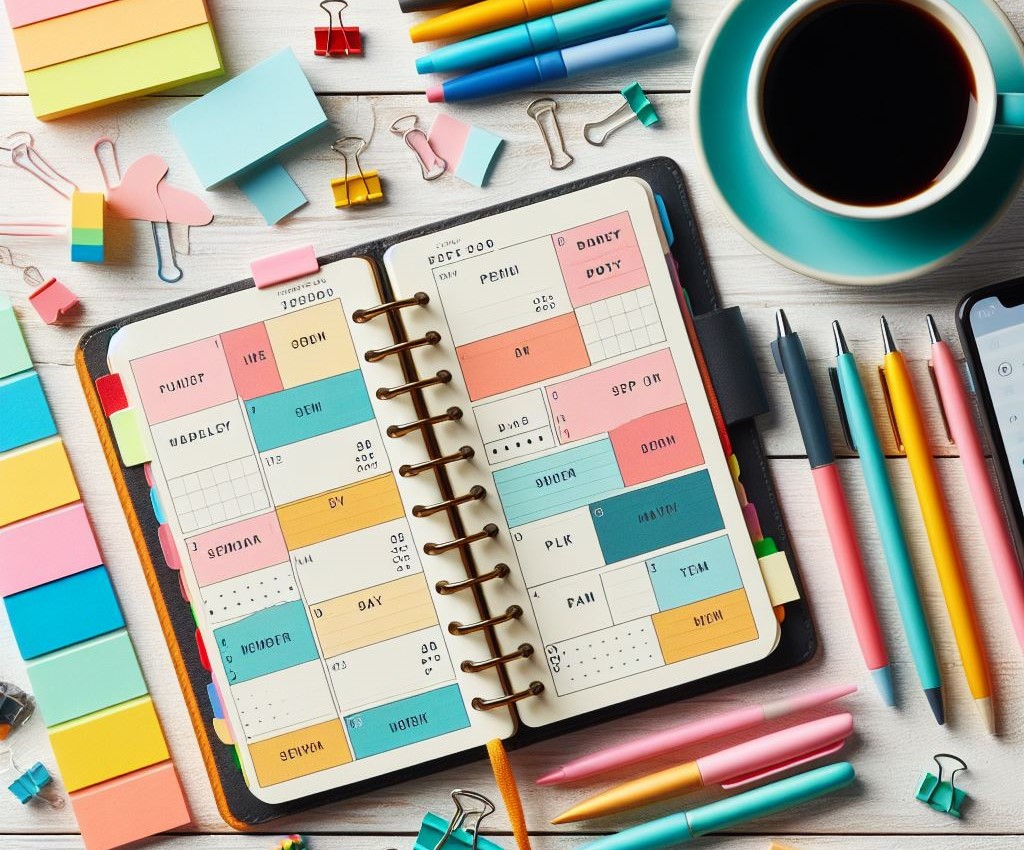
Figuring out how you like to plan can help you determine what to plan with. Some people love cracking open a new planner and going to their favourite craft stores so that they can decorate their weekly pages.

But others like a simple monthly planner that they can then use to break down their weekly pages in an undated planner. You may enjoy the creative aspect of bullet journaling or want to try your hand at habit tracking, in which case you may need a weekly planner that allows for this, rather than a basic weekly lifeplanner that only has space for a few daily tasks. Your planning style determines your perfect planner.

Do you have any specific requirements?

You also need to think about anything that is an absolute must in a planner. Most planners have some standard inclusions like monthly calendars and to-do lists for your weekly tasks, but sometimes, you need something extra. 

Maybe you want a planner that has time slots so that you can keep track of appointments. If you use a digital planner, you may want to choose one that syncs with different apps, or one like ZenDays, which allows for templating. 

Or maybe you want pages dedicated to note pages. Or some time management element. Some people want to have a monthly calendar included in their paper planner or look for a specific weekly layout in their weekly planners so that they have enough writing room to plan ahead.

Everyone has some non-negotiable things that they look for in their planners, so look for a weekly planner that offers you what you need.

which size is right?

If you select a physical planner, you need to think about which size suits your lifestyle. If you have a lot of stuff to get done and your planner has a permanent home on your desk, then a bigger planner might be better.

But if your planner is always coming with you, you may want a small planner that’s easy to transport – or a digital one, since you can simply bring your phone with you to access it. Similarly, if you just need a place to keep your to-do lists, a small notebook may be the only “planner” you really need.
does it suit your aesthetic style?

Yes, planners are there to be practical and help us be productive, but that doesn’t mean that they can’t be fun.

There are thousands of planners out there to match any aesthetic, from minimalist to colourful and everything in between, so choose one that sparks joy and inspires you to actually use it.

what do the reviews say?

Finally, look at what others have to say about the planner. What do they like, and what don’t they enjoy? Use this to guide you in selecting the perfect planner for you, and don’t be afraid to ask loved ones for recommendations!

final words

In conclusion, there are many weekly planner options out there, and the key is to find one that works for you. Because the thing is, the “perfect” planner for one person might not be the perfect planner for you. In the end, as long as you have a planner that allows you to get stuff done and that you enjoy using, that’s all that matters. Finding the top weekly planner for you really doesn’t need to be as hard as it seems!


How Do I Find the Best Weekly Planner for Me?

Once you reach a certain age and have responsibilities and a lot of other stuff on your plate, planning your weeks becomes essential. 

After all, we may like to think we’re superhuman and will remember everything, but that’s not the case. You need to have what I like to call a “second brain” – a place where you can store your thoughts, ideas, and to-dos. 

I’m probably preaching to the choir here. Most of us have already realised the importance of a good weekly planner. The issue, however, is selecting a weekly planner that works for you. With so many options out there, it can be overwhelming to try and wade through all the life planners, which is why I’ve put together a list of tips that should help you narrow down your options to find the perfect planner for you. 

digital, physical, or both?

Ah, yes. The big debate of whether digital or physical planners are best. I have a whole post about this, so I won’t go into too much detail. 

What it comes down to is this: there isn’t a right or wrong answer. Both options have their pros and cons. You need to decide whether you prefer the convenience of digital planning or the traditional method of paper planning. And don’t forget that you can use a combination of them both!

what are your needs?

Some people only need a planner to write down big events or time-related things like meetings, whereas others love having a planner that contains every detail of their lives, from their meals to their elaborate morning routine and everything in between.

You may also need a planner that has space to write down your children’s activities, or one that has a space for daily reflection. Think about what you will be using the planner for, and look for one that meets your needs. Your planner needs to fit your weekly schedule as well as your daily schedule, so be sure to keep that in mind when perusing weekly planners. The right planner for you is the one that effortlessly fits with your daily habits.

Do you have any specific requirements?

Once you’ve narrowed down what you want to use your planner for, you need to get into the nitty-gritty details. This will help you decide which planner format is the best option for the current stage of your planning journey. 

Think about any specific details you may want from your planner, and eliminate any planners that don’t have those things. Maybe you want an undated planner so that you have more flexibility when you use it. If you use a digital planner, perhaps you want one that gives you reminders or that syncs with other apps. Thinking about your non-negotiables will help you weed out any planners that won’t give you what you want. 

Some ideas of extra features you may want include a monthly budget, an ongoing to-do list, a monthly calendar alongside your weekly layouts, or a fun cover image. Also, keep in mind that many companies offer custom planners, so if you’re on the market for something specific in your weekly planning pages, that could be a good solution.

what does your research say?

Do your research! Look up reviews for physical planners, read the reviews for planning apps, and talk to your loved ones about which planners they use. 

What do people like about specific planners, and what drives them mad? I’m willing to bet that once you start looking into some planners, you will easily be able to tell whether they’re worth it or not. Also, think of your personal priorities in a planner and try to focus on planners that align with that. 

can you do a test drive?

When you use a planning app, you can try various apps – either at the same time or switching between them from week to week – to get a feel of which ones work for you and which ones don’t. This can help you narrow down what to use for your own planner. 

This is a bit harder when it comes to physical planners, of course, since no one wants to buy ten planners if they will only end up using one.

what's your budget?

The price range for planners is very broad. You could technically buy a small notebook and use it as your planner, or even type your weekly plans into your notes app. 

But there are very beautiful and elaborate planners out there that cost a lot, and there are also many paid planning apps that offer you great benefits that free versions don’t always get. Again, it comes down to what you’re looking for in a planner. In the end, you need to know what you want in a monthly planner and how much you’re willing to pay for it.

quick shoutout to ZenDays

Before I close this blog post, I would like to shout out a new planning app (and yes, I made it myself, so I am a bit biased). It’s called ZenDays, and it has everything that I myself look for in a digital weekly planner. Also, it’s not just weekly – you can use it for literally anything you want. The sky’s the limit. 

If you’d like to give ZenDays a try, click here.

the end

There you go! This was a nice and short post because in the end, it doesn’t really matter that much which planner you use, as long as you have a planning system that works for you. I get that it can be overwhelming, though, so I hope that this post gave you a bit of clarity and a starting point to help you figure out which planner to use for you.

You can use a combination of both, or use one for a while and then switch to the other as your planning needs change. In the end, your planning system should work for you, and that’s all that matters.


Digital vs Real World Diaries: Which is Best?

The debate of digital versus real-world has been around for years and is becoming even more prevalent as more of our lives are moving into the digital space. It’s been debated when it comes to banking, storage, photos, and more. 

With the evolution of digital diaries and planning apps, this is another element of the debate. Are digital or physical planners, diaries, calendars, and journals the way to go?

As with anything else, there isn’t necessarily a right or wrong answer. Both options have their pros and cons, so the important thing is weighing these up and figuring out what works best for you and your planning situation when it comes to the physical versus digital diary study.

the charm of physical planners

Let’s start with real-world planners. There is an age-old charm to these that cannot be denied, given the fact that millions of people still buy them despite the multitude of digital options available. 

There’s something peaceful about sitting down in a quiet corner, putting your pen to paper, and writing down your plans for the week. For those who love adding a creative flair to their planners, this is also a great option, since you can add drawings, stickers, and other artistic elements to your diary.

the convenience of digital planners

Of course, there’s one thing we’re all after in today’s busy world: convenience. And there’s no denying that digital planners are incredibly convenient. You can sync them across multiple devices so that you can plan on your laptop and multiple mobile phones, move and delete your plans as necessary, and even add password protection if you need some added security. 

Some planners, like ZenDays, even have advanced features like templates and weekly reports to make your planning life even easier. You can also add elements like links or video files, which may be helpful depending on what you want to use your planner for. 

Of course, you may not be the target audience for a digital diary. If you need something basic and you’re not on a quest for a deeper understanding of your planning methods, then you may need nothing more than a piece of paper.

bonus tip: you can use both

There’s no rule that says you need to pick one option and stick to that. Many people use a combination of the two for different aspects of their life, and you can do the same! Finding a balance between the two might be the perfect solution, especially if you can’t decide which one is for you. 

Look at your usage patterns to see if you are more drawn to traditional methods of planning like paper planners or whether you prefer a more modern option like a digital diary . . . or both! You may also find that during one time period of your life, a digital diary is best, whereas in another, a physical planner addresses your pain points. There’s no need to limit yourself!

Also, don’t let anyone make you feel like you should be using a specific type of planner. Be honest with yourself about what you need, and get a planner that helps you access this.

the final line

In the end, there’s a lot to be said about both real-life and digital planners. It all depends on what you want and what works for you. Try both, and try different variations of the two. It’s your life and your planner, so as long as you’re happy with it, that’s all that matters. 

Essential Weekly Planning Tools and Strategies to Help You Master Your Week

In today’s busy world, proper time management is even more important than it ever was. The issue, however, is that most people don’t know how to actually implement the proper time management strategies. 

I’m a bit obsessed with weekly planning – so much so that I created my own weekly planning app slash weekly schedule planner, called ZenDays – so I’ve tried all the tips and tricks, and gathered my favourite ones here to share with you today. Of course, everyone’s life is different, so their planning needs will be different. Feel free to take what resonates with you and leave the rest, and adapt as needed!

1. a calendar

Having a calendar is essential to help you keep track of certain things like birthdays, appointments, and other time-related things such as due dates or bills. If you have a calendar, you can easily glance at it at the beginning of each week to see what you have planned. You can then transfer these events from your calendar or monthly planner to your weekly planner. 

Some people love having a physical monthly planner like a whiteboard or paper calendar stuck to their fridge so that they see it every day, and others love digital planners like Google Calendar that sync across their devices. Try both and see what works for you!

2. ongoing task lists

If you have a thought like “I need to remember to do this”, don’t actually rely on yourself to remember it. You won’t. You think you will, but you won’t. Instead, make sure to write it down. Keep a to-do list of everything that needs to be done, and have a look at it each week to pick some essential tasks and write them down in your weekly planner. 

3. an actual planner

I’ve mentioned a weekly planner a few times now, and of course, this is a key element when it comes to effectively planning your weeks. There are thousands of weekly planners out there, from a paper planner to a digital one, catering for all your needs. Whether you need a small box to write important events, or a two-page daily spread to help you write down dozens of tasks, you’re bound to find one for you.

If you like being creative in your planning, look at paper planners that you can decorate with planner stickers, and if you prefer structure and simplicity, maybe opt for a digital planner!

4. templates

I’ve made a post before about the importance of having templates when it comes to your weekly planning. They help you save time and effort on your weekly planning, and also help you ensure that you don’t forget any important weekly tasks. Of course, templates are much easier when you do digital planning.

5. collaborative tools

If you work in a team, whether in a professional setting or at home with a spouse, having synced tools for collaboration can ensure smooth sailing. Sending digital calendar invites to all necessary members for meetings will help make sure that everyone knows when they are expected and where in both your professional and personal life. 

Shared calendars between parents can help them coordinate things like school pickups or even grocery shopping. Of course, this isn’t really possible with a paper weekly planner, so you need to figure out if this is important to you.

6. time block

Time blocking has also become quite popular in recent years, and if you are someone who struggles to focus and get things done, assigning a particular task to a specific time of day can help you stick to a schedule. Do be sure to allow some flexibility with this though, as some tasks may take longer than planned. 

That being said, most weekly planners come with some time-related element, so feel free to use this to visually plan your weekly tasks based on how long they will likely take you.

final words

If you weren’t convinced about how passionate I am about weekly planning, I hope this post convinced you, and I also hope that it gave you some insight into how you can organise your own week using tools to make organisation easier. 

Of course, planning differs for everyone, so don’t get stuck in a rut. If your planning strategy isn’t working for you, try something new! And if you are in the market for a new planner, may I suggest trying ZenDays?

Simplify Your Life: A Guide to Using the Simplest Weekly Planner

Weekly planning is something we all do in some capacity. Some of us have a detailed to-do list with time-blocking, others prefer jotting stuff down in their notes app, and others may try to simply remember everything they have planned for the week. 

Regardless of where you fall, I’d recommend having a consistent and effective weekly planner in your life. In the fast-paced world we live in, where we’re juggling numerous professional and personal responsibilities, having some structure and guidance is the key to keeping track of everything.

Otherwise, some tasks may get lost in the chaos. So, if you’re not sure whether or not to jump on the weekly planner bandwagon, you’ve come to the right place.

Why use a weekly planner?

If you’re a go-with-the-flow person, you may be wondering why exactly you should even bother with a weekly planner. Maybe planning just isn’t for you, right? Well, I’m a firm believer that a weekly planner can benefit everyone, and here’s how:

  • Organisation: you need to manage things that are set in stone, like appointments and meetings, and then figure out how to effectively use the rest of your time. A weekly planner helps you to do this.
  • Prioritisation: if you don’t have somewhere concrete to write down your plans for the week, you will likely just do tasks and duties as you remember them, which could lead to you forgetting about important deadlines and to-dos. A weekly planner can help you keep track of your top priorities on both a daily and weekly basis, so that even if you don’t get to everything you want to do, the important stuff gets done. 
  • Time management: the more you plan, the more you will learn about how long certain tasks actually take you. You can then use this information to plan your weeks more effectively in the future. 
  • Reduced stress: if you’re constantly frazzled and stressed, having a weekly planner can help. By taking your list of tasks out of your brain and putting it to paper, you free up some valuable mental headspace, and you don’t need to worry about what’s next – because it’s already in your planner. 

choosing the right planner

There are thousands of planners out there, and just as many planning strategies. And while everyone will have different needs that impact which planner they select, there are a few key things that you should look out for:

  • The layout: your planner should be functional and easy to read and understand, with clear blocks for different days. 
  • Size: if you use a physical planner, choose something small enough to pop in your work bag or handbag. Bulky planners aren’t fun! Alternatively, consider using a digital planner (but we’ll get to that later!)
  • Durability: the idea behind your planner is that you will use it every day, so it needs to hold up. If it’s flimsy, it won’t last very long. Make sure you have a sturdy cover and high-quality paper. 

digital vs paper?

The digital versus paper debate has infiltrated nearly every aspect of our lives, including planning. While there are certainly upsides to having a physical planner, more and more folks are switching over to digital methods of planning, and here’s why . . .

  • It’s space-efficient: you already have your phone or laptop with you wherever you go, so there’s no need to bring an extra planner or worry about forgetting your planner at home. 
  • Accessibility: digital planners can be synced across multiple platforms to ensure that you can always access your plans, no matter where you are. 
  • Cost-efficient: there are many free digital planners out there, but even if you do use a paid one, it’s often much cheaper than buying a physical planner, which helps you save money!
  • Eco-friendliness: opting for digital planners over paper planners can drastically reduce your paper usage. 
  • It’s adaptable: life changes! If you have written something on paper, it’s not really possible to move it, which can lead to your planner looking disorganised and confusing. Digital planners don’t have that issue. You can edit, delete, or move things as you please. 

my planner of choice

Here’s where the plot twist comes in: this is all a sales pitch. Okay, I’m kidding (sort of). Don’t click off yet, though! I truly do love planning, and I’ve seen firsthand the effect it’s had on my life. I’m passionate about helping people learn how to plan their week in a way that works for them.

That being said, in my journey to becoming a planning connoisseur, I’ve used countless weekly planning apps, and found them all to be lacking. So I did what any normal human would – I made my own.

Say hello to ZenDays, an intuitive digital planner that makes planning quick, easy, and fun. It has templates so that you don’t need to type out the same five tasks each week. It has emojis because they make life fun and they also allow you to categorise your tasks. It asks you questions like “Why did you not complete this task?” so that you can plan more effectively. 

And the great news is that you can sign up to try it out for yourself! Click this link to give ZenDays a shot.

How to effectively use a planner

Okay, sales pitch over. Once you’ve decided which planner to use (fingers crossed that it’s ZenDays), you need to actually use it. Your week isn’t going to plan itself! Here are my top tips:

  • Set time aside for planning: you need to dedicate time to planning your week. In fact, I’d say you should write this down in your weekly planner to make sure you prioritise it!
  • Write down everything . . . and I do mean everything. Yes, big stuff like meetings should be noted down, but you should also always jot down the small stuff like responding to your email, or fixing that leaky faucet. Don’t assume you’ll remember it because you won’t. 
  • Do regular reviews: are there some tasks you never do? Do you over-plan your weeks? Are some days busier than others? Make sure to carve out regular time for reflection on your past week so that you know which changes to make going forward. 
  • Celebrate your successes: finally, make sure to celebrate the tasks that you do get done! I like to write down some “wins from the past week” whenever I enter a new week, to keep me motivated. 

final words

Planning can feel overwhelming, especially when you’re new to it, and there’s so much conflicting information out there. Hopefully, this post gave you someplace to start and got your creative juices flowing when it comes to planning!

However, there isn’t a one-size-fits-all planner out there – everyone has different needs, and they need to find a planner that meets those needs. And, of course, you also need to find your own way of using that planner. So, don’t be afraid to experiment and change things to suit your life.


Maximising Your Time: Overcoming Overplanning for Optimal Productivity

Can we start with a round of applause for that stellar title? Alliteration for the win! Anyway, now that I’ve boosted my ego, it’s time to talk about something that’s really been on my mind lately: overplanning. 

If you don’t know by now, I’m on a quest to make the most of my time and help others do the same. And two things that I’ve found to hinder the process are:

  1. Not using templates
  2. Overplanning

I spoke about templates in another blog post, so you can give that a read here. Today, though, I want to tackle the second problem: overplanning. I also have a video about this, if you’d prefer to watch that.

What is overplanning?

Let’s start by defining what overplanning is. It’s pretty self-explanatory; it’s when you plan too much. When there are too many tasks in your week, despite only having a finite number of hours to get them done.

How do you know you're overplanning?

If you’re awkwardly trying to convince yourself that this blog isn’t talking to you, you’re probably overplanning. But let’s face it – we all over plan to some extent. 

Do you struggle to stick to your weekly schedule? Do you constantly move things from one day to the next? Yeah? Me too.

It’s hard to balance ambitions with the reality of your daily life. I get that you want to do all those tasks, but that doesn’t mean you actually can. That’s why this post aims to help you stop overplanning.

The pitfalls of overplanning

So, why exactly is overplanning a bad thing? I mean, if you don’t get everything done, you can just do it later, right?

WRONG. 

If you’re an ambitious person hoping to achieve a lot in life, it’s so easy to fall into this trap. There’s something exciting about a jam-packed schedule filled with productive tasks. 

But in the end, if you over plan, something is going to get neglected. Maybe you never have time for morning meditation. Or you keep cancelling on your friends. Or skipping meals. Or not getting enough sleep. 

Basically, if you keep overplanning, you will burn out. And you will feel like a failure (which is arguably the worst thing possible that can happen to an overachiever.) 

the need for feedback

Hi. My name is Max. And I’m an overplanner. They say that the first step to recovery is admitting you have a problem, right? Well, my problem is thinking that I’m superhuman and can somehow fit one hundred hours of work into one day. Spoiler alert: I’m not, and I can’t.

That’s where feedback comes in. I created a planning tool, called ZenDays. And it’s honestly much more than just a planning tool. It aims to help you break this cycle of overplanning by gathering feedback on your time management issues. I get that feedback can be scary. Analysis paralysis and all that. But it’s a key to helping you stop overplanning. 

You can track progress, see where you succeeded and where you failed, and most importantly, figure out why you failed. In this way, you can optimise your time even better. Feedback is, in my opinion, the most important thing when it comes to time planning, and the more you do it, the easier it will be to overcome the dreaded analysis paralysis.

a closer look at ZenDays

As mentioned, I am the creator of ZenDays, so I obviously want to highlight it a bit. Can you blame me?! I’m like a proud parent, wanting to brag with their child. 

So, what does ZenDays have to offer?

  1. You can set goals for different timelines.
  2. You can create weekly templates.
  3. You can mark off tasks as completed, partially completed, or not completed.
  4. You can select why you didn’t complete a task.

This feedback loop helps you figure out how effective you truly are at time management, and how you can improve. Plus, it takes a few minutes, rather than a few hours, because it does so much work for you. It’s the gateway to creating the perfect plan. 

so, how can we avoid overplanning?

Now that you know about overplanning and why it’s the biggest obstacle when it comes to your planning, it’s time to kick this problem to the curb, and here’s how.

1. turn data into action

So, you’ve admitted you have a problem with over-planning. Welcome to the club, by the way. And now you know that feedback can help you overcome this problem. But what’s the next step?

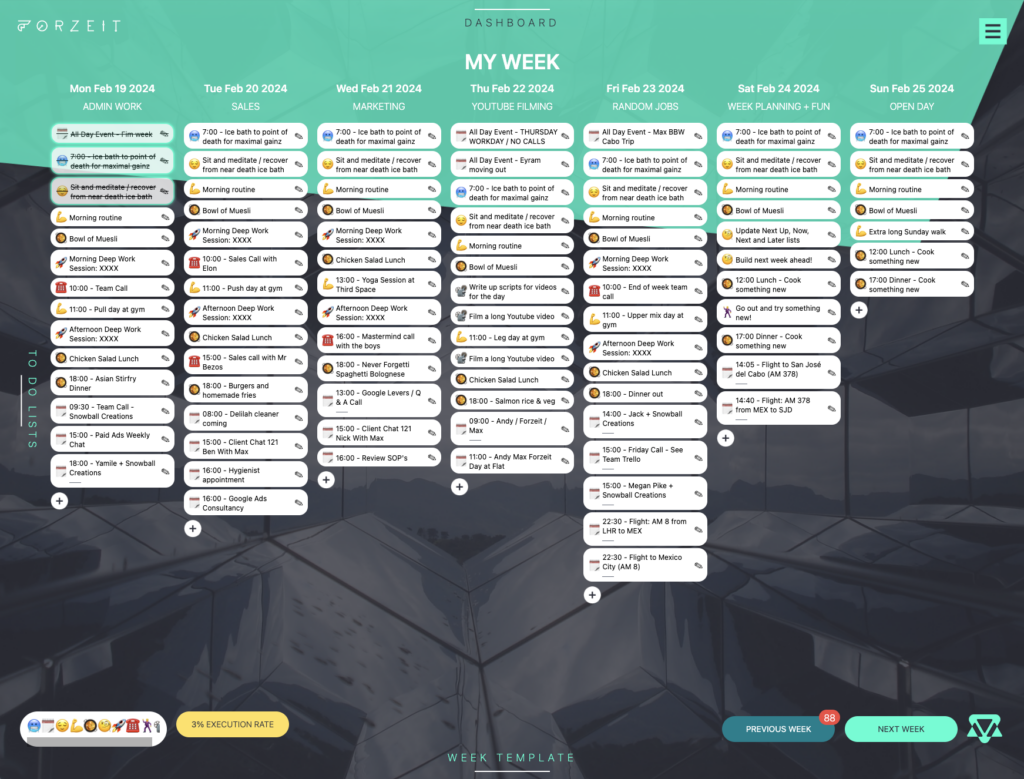
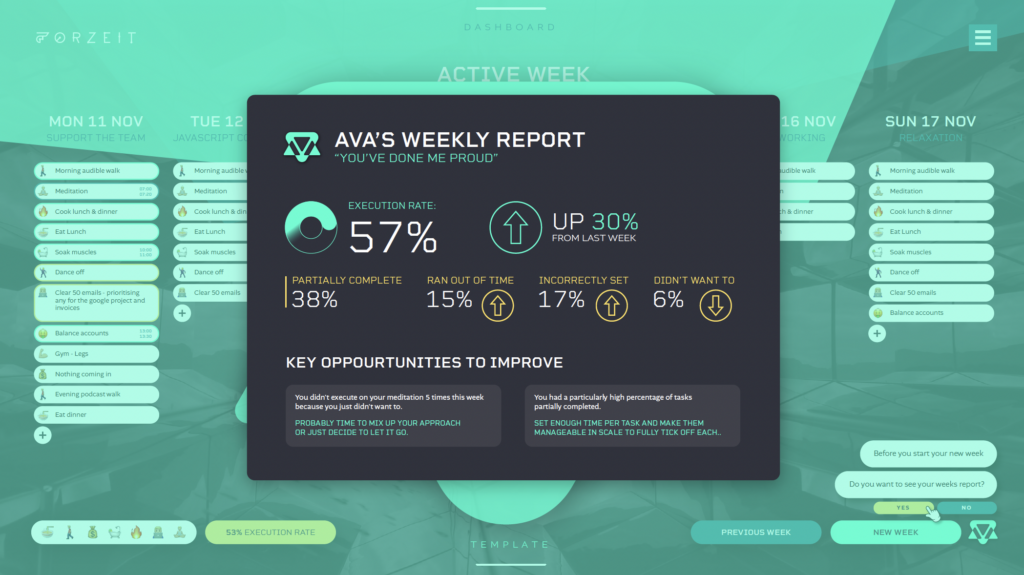
I’m mentioning Forzeit again because I haven’t found another tool that does this quite as effectively (hence why I built my own). Forzeit calculates your execution rate. It shows you what percentage of tasks you did versus didn’t do, as well as why. 

This can help you figure out whether your progress is being hindered by over-planning, lack of motivation, or other factors.

2. start improving

Once you have the knowledge of why you are struggling with certain things, it’s much easier to make informed decisions to refine your schedule. If you always run out of time, reassess your priorities by removing non-essential tasks, or breaking tasks down into smaller chunks.

3. be honest

We are all limited. By time, by resources, by money, by our own capabilities. It’s a hard pill to swallow, but it’s the truth. And being honest with yourself will help you realise your limitations and do your planning with that in mind.

Make your decisions based on real data, rather than an idealistic version of yourself and your week.

Conclusion

Overcoming overplanning is a struggle most of us face in some way, and while it may seem like a small thing, being able to plan your week in a balanced and realistic way will remove a lot of stress and increase your chances of succeeding at your goals. 

Give it a try, and if you’re looking for a tool to help, why not consider Forzeit? You can sign up to try it here

Weekly Planning Tips to Help You Execute on Your Week Better: The Power of Templating

For most of us, time management is a far-fetched goal, rather than a reality. We’re juggling a million balls – and all of them are made of glass. 

I’m a bit obsessed with time management (so much so that I started my own intuitive planner, ZenDays), and I think I’ve cracked the code to successful time management: templates. I made a video about how I use templates to plan my entire week – from my to-do list to my weekly plans and important tasks, and I want to share that with you as well. 

Because let’s face it: most of us don’t have the time to spend hours planning every detail of our weeks every Monday morning.

The plannning conundrum

There are two major issues that hinder time management: planning taking too long, and overplanning. I want to focus on the first issue today. But keep an eye out, because I’ll have a post on how to help you avoid scheduling too many tasks soon!

We all know that planning is the key to success, but the truth is that it’s simply not a priority. I get it! When you have a business and a family and a life, your precious free time is most likely not spent planning. Which means most of us end up with a subpar weekly schedule. 

Well, whoever said you can’t have your cake and eat it too was wrong, because you can! At least, you can if having your cake means saving time and eating it too means still having a good weekly schedule.

the superhero: templates

This is where templates come in. Most of us have a lot of recurring events that carry on from week to week. That annoying Monday meeting, your child’s soccer practice, your grocery shopping day, your meal planning, your yoga session . . . you get it.

So, instead of writing or typing these things in your weekly schedule time and time again, why not have a template that allows you to simply add these repeatable tasks and take the effort out of it? 

You can still have a to-do list that changes depending on what you need to do on a specific day or week, but your weekly tasks will already be scheduled in your upcoming week thanks to your template.

here's how it works

  1. Identify repeatable elements: Figure out which tasks repeat each day or on the same day each week. Prioritise tasks that recur every week. 
  2. Create your template: use whatever tool or weekly planning app you like to create a template based on these elements (I, of course, recommend ZenDays, but I might be slightly biased). Think of these templates as frameworks so that you don’t need to start your weeks from scratch every time. 
  3. Integrate calendar events: ZenDays allows you to integrate your calendar event with your template, but if your templating app isn’t as cool as that, simply manually add these in to ensure you have the full picture. 
  4. Iterate and optimise: your life isn’t static, so your template shouldn’t be either. Make sure to regularly check in to see where you can finetune your template. Look at your past week, and think of ways to effectively plan your week ahead.

benefits beyond saving time

If the idea of saving heaps of time isn’t enough to convince you to use templates in your weekly planning, there are a few other things that might bring you over to my side.

  1. Improved focus: if you have a template, you can spend more time doing what actually matters instead of trying to set up a weekly plan. 
  2. Consistency: you’re much more likely to stick to new habits if you have them in your templates! They’ll form part of daily planning and weekly routine. 
  3. Adaptability: your template is a base. You don’t need to follow it to a T. If you have a week that’s very different from the norm, remove the parts of your template that aren’t relevant for that week and get back to your normal weekly routine the following week. 

in conclusion

Templates are life-changing when it comes to planning, and I for one don’t know why more people don’t utilise them! 

Seriously, if you haven’t already tried it, please do. If it doesn’t work for you, that’s fine, but I’m willing to bet you’re going to wish you’d discovered this method of planning much sooner! It will help you complete tasks effectively, set achievable weekly goals, and balance your professional and personal life. 

From Planning to Execution: Time Mastery with Max, Ava, & Forzeit

the problem?

You know that planning makes you more effective in both executing on your work goals, but also personal.

You set yourself this epic list for the day, but how often do you actually complete it? You meditate every morning. Right?!

You tried Timeboxing, Trello, Todoist or another tiringly complex software out there, but none hit the mark.

So you mix your calendar and some kind of to do list together into a somewhat workable solution. But you know it could be better.

Well, I have an alternative…

the solution

Forzeit is a time management system made for individuals managing their own time and who have a lot of leverage against that time. What you do with your time matters.

Forzeit speeds up the process of planning by 10x and gives you constant feedback to help you plan more honestly and effectively.

How we deliver this can be broken down into three parts…

1. Weekly Planner

One of the big challenges to planning is that it takes time. Particularly, the smaller stuff. But that small stuff matters! Forzeit allows you to build a perfect week of daily to do lists from the smallest new habit, through to the big projects, in a fraction of the time.

Forzeit allows you to build a template of your perfect week!

2. Critical Feedback Machine 

The other big challenge is holding yourself accountable. To know how you’re really doing you need feedback. This is the biggest missing piece that these other apps and calendars fail at. Forzeit gives you this critical feedback.

Each week, when you hit build your week, you will be given a personalised report by Ava, your AI assistant. This will detail your overall execution rate for the week plus details on which tasks you’re missing, and also why you’re missing them! This allows you to be more honest with how you plan.

3. Human Onboarding

Alongside Forzeit and Ava, you have me. Now, about 10 years into building businesses after a successful sales career, my superpower is execution. The Forzeit system is the result of over a decade of weekly iterations and tests conducted on myself. I have lived this system!

I’ve spent hundreds of hours in one-on-one interviews and coaching calls, helping high-achieving individuals become more effective in executing on their time. 

Initially, we will go through an onboarding process where we take the work away from switching from your existing system and help to transfer to do lists and build templates for you. 

I will be available 24/7 with regular zoom calls to help you reshape your planning and time habits.

I’ll be the ultimate right hand man, holding you accountable alongside the software. 

Then over time the calls will reduce with me as you take charge.
 
All of this combined will allow you to progressively plan the best week of your life, every week! 

Execute on your grandest ideas, whilst living a life you love! 

I will make you a fucking master of your own time! 

Others experience

Hear from current active users of Forzeit on their experience to date. 

Why they went ahead in the first place, who this system is right for and what they think of it altogether.

The program

Our level of support comes in three levels…

Optimal

Top priority attention from Max and Andy for both coaching and development. 

This is the optimal path to levelling up your systems around time management and productivity.

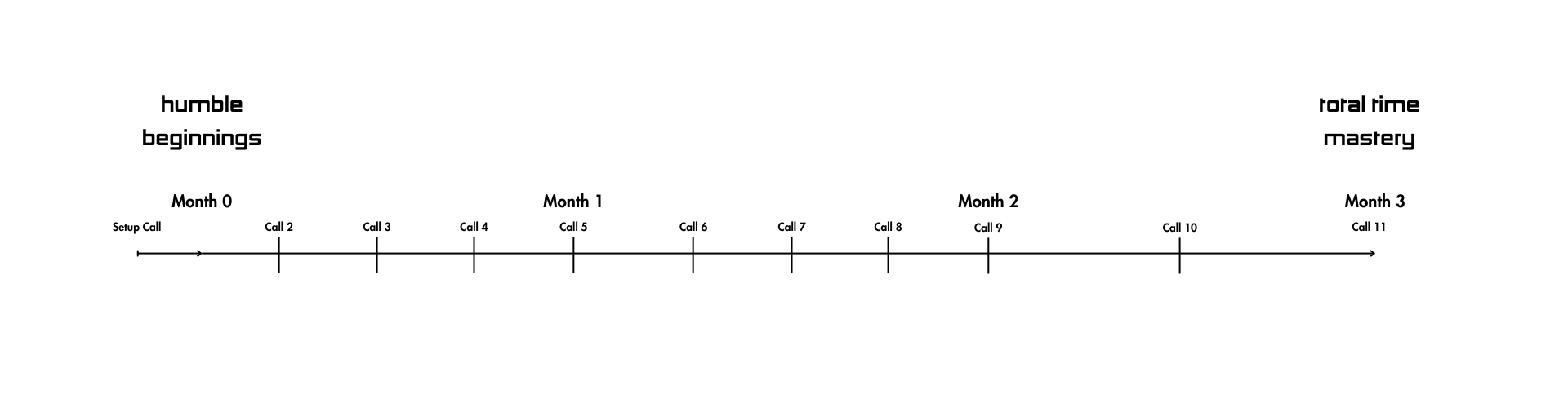
  • 3 month program
  • Weekly calls for the first 2 months to hold you accountable to your goals, weed out bad unconscious habits and upgrade your approach to work and life
  • Direct WhatsApp comms with Max any day of the week
  • Feature/software requests and feedback given top priority

Price:

  • £499 p/m for 3 months
  • £29 p/m after that
Premium

High priority attention from Max and Andy for both coaching and development. 

Built to give founders all the support they need to upgrade how they manage their time.

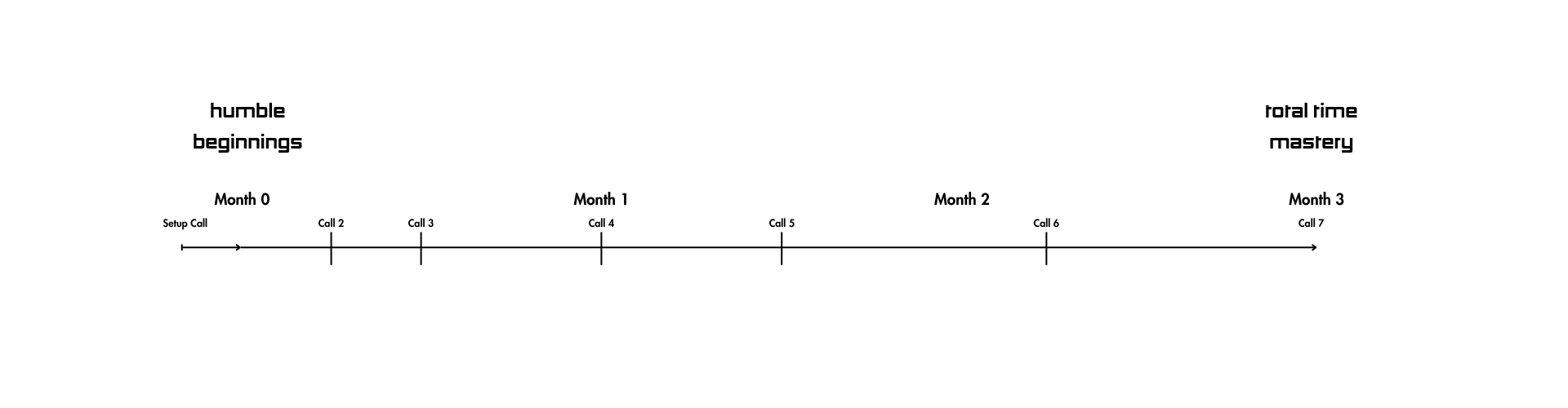
  • 3 month program
  • Regular biweekly calls for the first 2 months dropping down to less regularity in month 3 to let you gradually take charge of your own time management
  • Direct WhatsApp comms with Max responded to with high priority
  • Feature/software requests and feedback given high priority

Price:

  • £199 p/m for 3 months
  • £29 p/m after that
Basics

For those who potentially have less time available in the moment and aren’t able to invest as much to the process.

This path gives you the basics of onboarding and checkin calls with Max to still give you what you need to succeed.

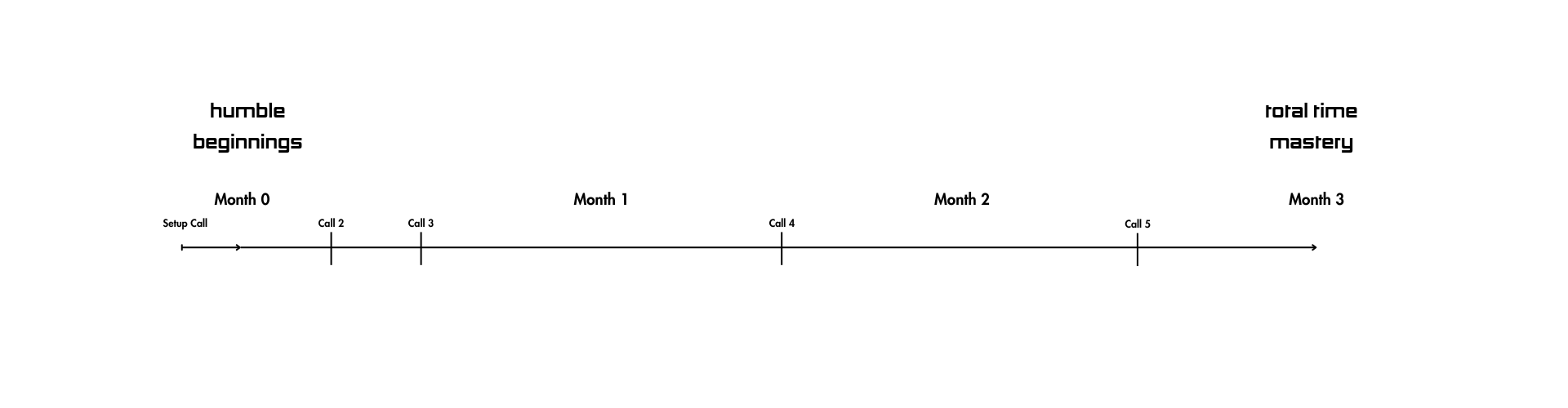
  • 3 month program
  • A few calls over the starting weeks and check in calls part way through month 2 and 3 to get you unstuck
  • Direct WhatsApp comms with Max
  • Feature/software requests happily received and noted

Price:

  • £119 p/m for 3 months
  • £29 p/m after that

Have a cofounder, personal assistant or additional team members you want included? Add them on with a 30% discount off any of the above packages.

(NOTE: We’re taking on clients in small cohorts of 5 per month. All cohorts are fully booked for a month ahead currently. The next available cohort start date is November. 1 spot left.)

The details

  1. This package runs over a 3 month period and to accept, complete the form below and we will then set up a Stripe subscription for you to confirm your spot. 
  2. You have a full money back guarantee if you feel you didn’t gain enough value for our fee. We will email you a week before payment is taken to give you the chance to let us know you didn’t feel you took enough value from the process and would like the payment cancelled or reduced.
  3. Your subscription to the software will continue on at the software only cost of £29 p/m, but you’re free to cancel at any time. Or if you choose to continue on with coaching from Max this can be agreed at the time.
  4. Coaching will start hot and gradually cool off, being very hands on at the start and then letting you take the reigns on your own later on. The schedule will follow the below call structure with adjustments to fit around our lives:
    1. Month one
      Concierge onboarding process to minimise setup, map out the big picture together and setup your initial week template. The level of this adjusts with each different program.
    2. Month two & three
      Less and less regular calls together, leaving you to build your week alone more and more. Iterating through updating months goals and coming to the end of the quarter.

Optimal Program Call Structure
Premium Program Call Structure
Basics Program Call Structure

Up for it?

To go ahead, fill out the below application.

Once complete we’ll reach out to you to let you know the next available cohort if it’s a right fit for both sides.

We will then send over a link to make your paid Forzeit subscription.

Questions? Email or WhatsApp me max@zendays.com / 00447366387566

I’m looking forward to hearing from you!

APPLICATION FORM

If you’re happy to move forward, simply fill out the below form

If we feel it’s a good fit, we’ll send over the link to complete your subscription

From Loser to Productivity Maestro: How You Can Set Up a To-Do List That Transforms Your Life

I love to-do lists. And there’s a simple reason for it: my life changed because of to-do lists. Sure, there were a lot of other things that I had to do to get from rock bottom to where I am now, but it boils down to the fact that I used to-do lists to help me turn my life around. 

It sounds dramatic, but it’s true. I recently made a video sharing my experience, and today, I thought I’d write about it as well.

The loser, the lady, and the wake-up call: where it all began

At the ripe age of twenty-four, I was a loser. It sounds harsh, but that’s the simple reality of it, and reality is often harsh. 

I had no ambition, and I was slowly wasting away – even though I didn’t realise it at the time. And then the plot twist happened: the girl I was seeing dumped me for another guy. 

As much as it sucked, this was the key event that propelled me to realise that I needed to make some changes, and I needed to make them soon.

The magical elixir: to-do lists

Most people who have this epiphany and renewal of motivation to change their lives end up diving head-first into resources to help them better themselves, and I was no different. I consumed self-help books like they were my only source of sustenance. I watched YouTube videos. I researched deep work. 

And voila! It paid off. I found what worked for me: to-do lists. Of course, there are thousands of ways that you can set up to-do lists, but for me, it was a trusty Trello template that helped me plan out every second of my week. 

Checkbox by checkbox, I started to upend my lifestyle and work towards becoming my ideal self. I know, this sounds like any other self-help advice – I’m cringing just reading it. But what can I say? I’m here to share my experience, and that, my friends, was my experience. 

Four life-changing to-do list hacks

Okay, enough blabbering on about how to-do lists were my lifesaver and all that. Let’s get to the point: what did I learn about to-do lists? I want to share this with you, so that you can maybe skip a bunch of steps and dive straight into the good stuff. 

1. templates are your friend

If you need to start your to-do list from scratch each week, it’s going to take you hours – at least, it will if you have as many important tasks on it as I do. At this point, your to-do list will be more of a hindrance than a help, like the friend who thinks they’re being helpful, but is really just getting in your way.

You need to make setting up a to-do list as easy and friction-free as possible. Take the thought out of it. Automate it. In other words, have a template that you can work from. This is especially great if you want to keep track of your recurring tasks, and you’re worried you’ll forget to do a particular task on a specific day. 

If you have certain things that you do on certain days – such as changing your sheets on Sundays, or going to a yoga class on Wednesdays, add them to your template. 

This way, you can just duplicate your template each week and adjust it according to your needs, rather than starting with a blank page. While a written to-do list can be great, they aren’t ideal for duplication, so this is why my digital to-do list is my best friend.

2. Have multiple lists to help you in the future

Breaking down your to-do list into tasks for the day is great, but we’re humans, which means we’re always thinking ahead. You need to have a place to capture all your thoughts about future tasks (because, trust me, you won’t remember them, no matter how hard you try.)

I generally have separate lists for “now”, “next”, “next up” and “later”, but you can create lists in whichever way works for you. The key is simply to have somewhere to store your tasks in order of priority. This way, you won’t ever feel like you have too many tasks to deal with at once. You can focus on your important tasks now, and look over how many tasks you have in the future at a later date. 

3. Replace randomness with strategy

I know it’s easy to add a task to your to-do list and leave it wherever it lands, but that’s not going to help you. Instead, have some type of strategy in place to help you organise your tasks. 

Me? I like to do them in chronological order. This way, I can remember to do things like meditate first thing in the day. But play around with different systems. Maybe you want to order them by priority tasks, or perhaps you want to start with the tasks that you least want to do, or all the tasks that go by the quickest.

4. reflect, reflect, reflect

Finally, you need to make sure that you’re not just going through the motions and sticking to the same template or structure you started with just because it’s easy. 

Instead, you need to take some time to reflect each week. What worked? What didn’t? Which tasks did you not tick off . . . and why? Your life is going to change, and you need to make sure that your to-do list adapts.

Another part of reflection is to give yourself a pat on the back! I love having a place in my weekly to-do list where I can write down my previous week’s achievements and give myself the motivation to keep going. It’s like having my own private cheer squad!

ZenDays: the to-do list jedi

Remember what I just said about patting yourself on the back? I’m about to do just that. I realised that while there were many to-do list apps out there, they just weren’t cutting it for me. 

I run my own business, and I’m also always on my journey of self-development, so there are a lot of things that go onto my to-do list. I’m serious: I don’t just use it for a big task like a meeting. I also use it to make sure that I take my creatine in the morning, I use it to remind myself to answer emails, I use it to plan my meals and to remind myself to go grocery shopping . . . it’s a hub for my entire life. 

And no to-do list app or software was really cutting it and allowing me to manage my life the way I wanted. 

Enter ZenDays. This is a tool that I designed to help me master my to-do lists. From my personal to-do list to my work to-do list, this is a hub where all my digital to-do lists and important tasks can find a home. It’s broken up into goals, weekly lists, daily dashboards, and more. I’ve even added a fun emoji feature that allows you to filter through certain tasks. 

You can easily duplicate tasks so that you don’t need to keep adding the same daily tasks over and over again. You can add notes to help you batch similar tasks. You can keep track of completed tasks, and stay on top of multiple projects.

And you can be a time lord too! You can sign up to be an alpha tester of ZenDays – which will include a one-to-one consultation with me.

Conclusion

I can admit that there are still a bunch of things that I want to achieve, but looking back, I am miles away from where I used to be, and that’s all thanks to to-do lists.  

I’ve become a healthier, happier version of myself. I’ve bid farewell to my day job and started multiple successful businesses. And sure, I deserve a lot of credit for that – but I also know that having a system in place to help me stay on track was a key element. 

Now, if you’ll excuse me, ZenDays is calling my name, so I’m off to write (yet another) to-do list.